
PixelPulse: know the moment your checkout tracking breaks
A theme update or an expired token can silently stop Meta and Google from seeing your checkouts. PixelPulse watches your store's checkout events, shows whether your tracking is healthy, and can forward a server-side backup copy to Meta and Google Analytics 4.
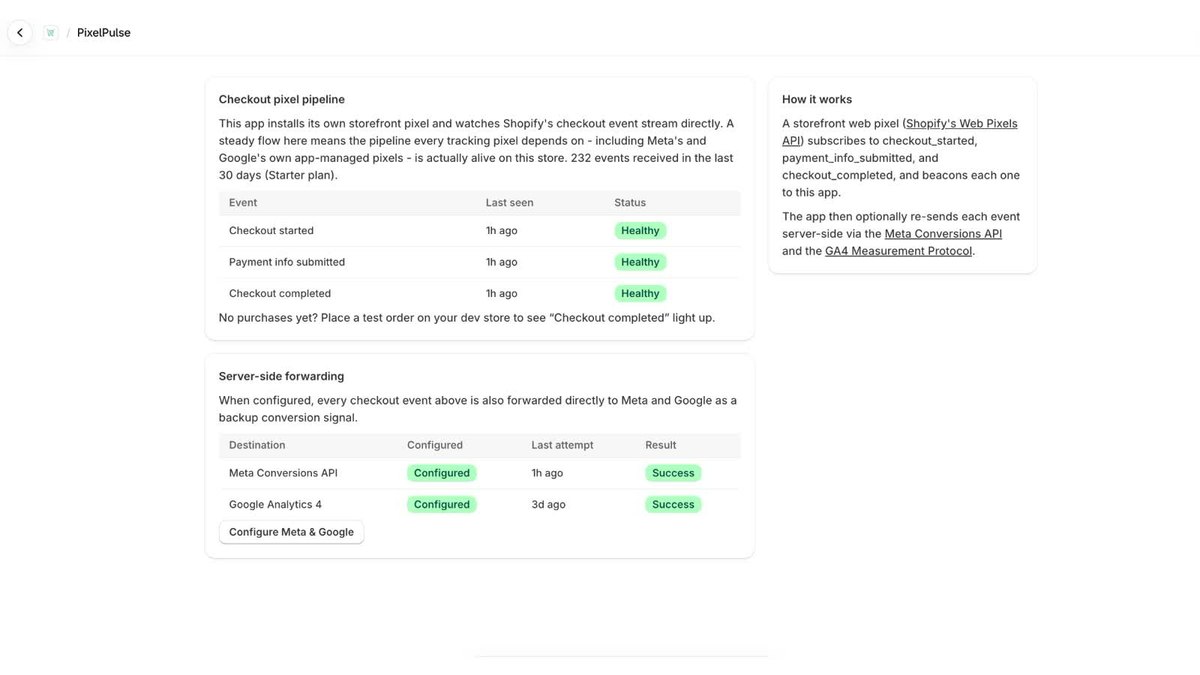
What PixelPulse does
Watches checkout events
Observes Shopify's checkout started, payment info submitted, and checkout completed events on your store.
Shows tracking health
A dashboard shows at a glance whether your checkout tracking pipeline is working.
Server-side backup
Optionally forwards each checkout event to Meta (Conversions API) and GA4 using credentials you provide.
Failure alerts
On Starter, get a Slack alert when the pipeline or forwarding fails.
Getting started
1. Install
PixelPulse adds a storefront web pixel that observes standard checkout events.
2. Connect Meta or GA4
In the app's settings, add your own Meta and/or GA4 credentials if you want server-side forwarding.
3. Check the dashboard
See whether checkout events are arriving and whether forwarding is succeeding.
Plans
| Plan | Price | Forwarding | Alerts | History |
|---|---|---|---|---|
| Free | $0 | 1 platform (Meta or GA4) | No | 1 day |
| Starter | $19 / month | Meta and GA4 together | Slack alerts on failure | 30 days |
Starter includes a 7-day free trial and covers 1 store. Current prices are always shown on the App Store listing.
Frequently asked questions
Does PixelPulse replace my Meta or Google pixel?
No. It monitors whether your checkout tracking is working and can send a server-side backup copy of checkout events. Your existing pixels keep running.
Do I need to give PixelPulse my Meta or GA4 credentials?
Only if you want server-side forwarding. Monitoring works without them.
What customer data does it store?
No names, emails, phone numbers, addresses or payment details. It records event type, time, checkout and order IDs, currency and value, and — only when Meta forwarding is on — the visitor's IP address and browser user agent, which Meta's Conversions API needs for matching. See the privacy policy.
How are alerts sent?
On Starter, a short summary (no customer data) is posted to the Slack webhook URL you provide.
What happens to my data if I uninstall?
All data for your store is deleted within 48 hours of uninstalling.
Support
Tracking not showing up, forwarding failing, or a question about setup? Email us with your store's .myshopify.com address and what you're seeing.
support@moezeeshop.com